A 3D model that opens inside a web page, turns under a finger and responds to clicks is no longer experimental. It works in any recent browser, on a desktop or a phone, with nothing to install. Most of the time, Three.js is underneath.
We've used it for years for product viewers, navigable maps, technical documentation and configurators. Here's what it is, when we choose something else, and above all where the work actually is, which is almost never where people expect.
What Three.js is
Three.js is an open-source JavaScript library, MIT-licensed, that sits on top of the browser's graphics APIs. The browser exposes WebGL (and now WebGPU), a low-level interface made of buffers, shaders and GPU state. Three.js adds the concepts you actually think in when you work in 3D: a scene, a camera, lights, meshes with their materials, and a renderer that draws everything every frame.
The mental model is a graphics engine stripped down to the essentials. Three.js has no editor, imposes no project structure, and doesn't handle physics or spatial audio. It's a library, not a full engine, and that is both its limit and the reason it's everywhere: it drops into any site, alongside any framework, and it's light.
Two recent changes matter if you're deciding today:
- WebGPU. Three.js has a production-ready WebGPU renderer that falls back to WebGL 2 where WebGPU isn't available. The gains show up in scenes with many objects and in effects computed on the GPU.
- TSL, the Three.js Shading Language: you write materials in JavaScript and the library translates them for WebGL or WebGPU. A custom material no longer has to be written twice.
What you can build with it
We see four use cases most often.
Product viewers and configurators. The product in 3D on the page, with finishes and variants to switch. It's the most commercial case and the most demanding on materials: if the wood on screen doesn't match the sample, the configurator works against whoever publishes it.
Navigable environments and maps. A building, a plant or a campus you move through, clicking on points of interest. Our DualData platform started here: a viewer that attaches specs, documents and procedures to the parts of a model, plus an editor for preparing content without writing code.
Technical documentation. The manual tells you what to do; the model shows you where. In an internal prototype we're connecting an assistant that answers questions about a machine's service manual (over 1,300 pages) to a Three.js viewer: when the answer mentions a part, the camera flies to it and the rest of the machine turns transparent. The hard part is neither the 3D nor the language model. It's the dictionary in between, which maps the manual's names to the nodes of the 3D file, because node names exported from CAD are never readable.
Scenes captured from reality. Photogrammetry and Gaussian splatting bring real places into the browser. Here, though, Three.js isn't always our first choice, as you'll see.
Three.js, Babylon.js, PlayCanvas, Unity WebGL
We pick the tool to fit the project. In short:
| What it is | When we use it | |
|---|---|---|
| Three.js | Lightweight library, no editor | Viewers, maps and configurators inside an existing site; maximum control over rendering |
| React Three Fiber | Three.js written as React components | When the 3D lives inside a React app and has to share its state |
| Babylon.js | Full web engine, maintained by Microsoft | Projects that want physics, GUI and tooling ready in a single package |
| PlayCanvas | Web engine with an online editor | Interactive Gaussian splats, and teams where non-programmers need to edit the scene |
| Unity WebGL | Web export of a Unity project | When the same project also has to ship to a headset or an app; you pay in file size and load time |
Our Gaussian splat viewer, for instance, is built in PlayCanvas: plenty of tools render a splat well, the value is in making it navigable and clickable, and there the editor saves us time. For a viewer that has to live inside a client's site, with their design system and framework, Three.js is still the cleanest choice.
The real problem is the budget
When a web 3D project goes wrong, the library is almost never to blame. The model is. A file built for an offline render, or exported as is, lands on a phone and brings it to its knees: long downloads, video memory running out, frame rate collapsing.
The reference format is glTF, almost always in its binary form, GLB: a single file with geometry, materials and textures. Inside that file, the weight almost always hides in the same place.
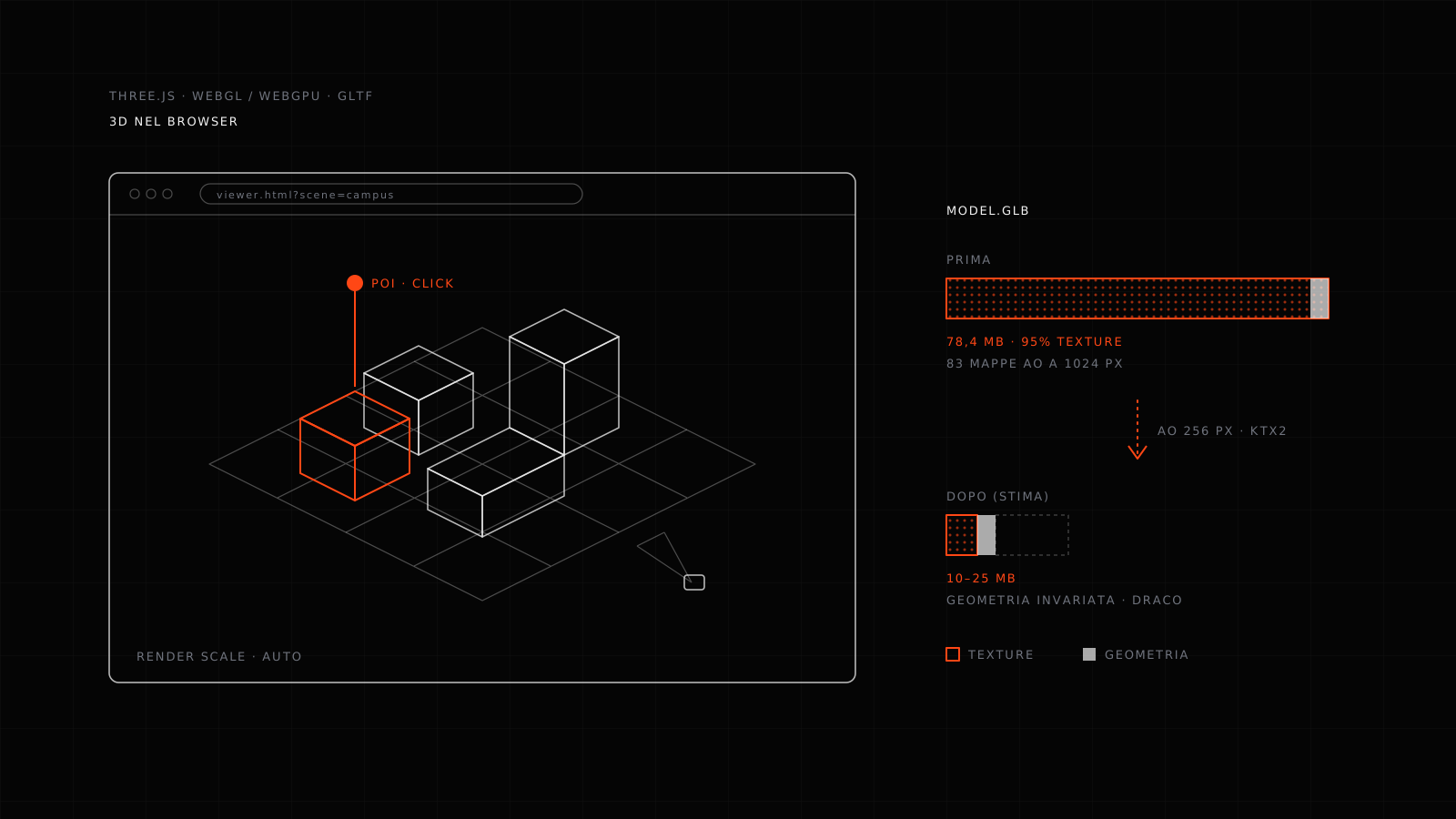
A case of ours: a wayfinding web app for a university campus, with buildings rebuilt from map data, ambient occlusion baked per building, and clickable points of interest. The model.glb file weighed 78.4 MB. The geometry was already light (545,000 triangles, Draco-compressed). 95% of the weight was textures: 113 images, nearly all 1024×1024, including 83 ambient occlusion maps, one per building, that alone took 56 MB.
Ambient occlusion is low-frequency information made of soft gradients: at 256 pixels it's indistinguishable from 1024. Downscaling it and converting the images to WebP or KTX2 brings the same model into a range our analysis puts at 10 to 25 MB, with no visible loss and without touching a line of the viewer. The work is done with gltf-transform, on the file.
The levers are almost always these:
- Draco or Meshopt on geometry. They compress well, but they're rarely the bottleneck.
- Textures sized by role. Base color deserves more resolution than roughness, normals and occlusion. One resolution for every map is the most common waste.
- KTX2. A PNG or JPEG texture is decompressed in GPU memory: a 2048×2048 takes about 16 MB of video memory, whatever the file size. KTX2 stays compressed on the GPU too, and on a phone that's often the difference between a scene that runs and one that crashes.
- Adaptive render resolution. Instead of stripping detail from the model, you lower the resolution the scene is drawn at on weaker devices. In the campus viewer it's a scene parameter that can also be forced from the page URL.
- Fewer draw calls. A hundred objects sharing one material cost far more than a single merged object. Merging static meshes and instancing repeated elements does more for frame rate than almost any other optimization.
The check happens before delivery, on the file, with the numbers in front of you: how heavy it is, how many textures, at what resolution, how many draw calls. That's why we use an internal tool that opens a GLB and shows where the weight is.
Three.js and AI
Social feeds are full of videos where a language model generates a city or a seabed in Three.js in seconds. They're real, and they show something useful: the repetitive code (scene, lights, camera, basic animation) is now quick to write, and a prototype that used to take a day can be on screen in minutes.
What the prompt doesn't solve is everything else in this article. Real data: a product with its actual dimensions, a surveyed building, a machine with the right part names. The budget, meaning the scene has to run on a client's phone, not on the computer that generated it. And the interaction that helps someone decide something. A generated prototype is a great starting point, not the finish line.
When you don't need it
If the product is simple and only needs to be turned around, a ready-made component like Google's model-viewer does the job in a few lines of HTML, without building a scene. If the goal is a video, an offline render costs less and looks better. Three.js makes sense when someone has to step into the model, touch it, change it, or find information inside it.
We build 3D applications for the web and for headsets, starting from real data: what we do with System, the DualData platform, or get in touch.